EN


What Features Should Buyers Compare in Infant Incubators?
Buying an infant incubator is not a matter of ticking off the longest specification sheet. A neonatal team, biomedical engineer, infection-control lead, and procurement team may each see a different risk in the same configuration. The practical question is whether a proposed infant incubator supports the intended care workflow, the required environmental controls, and a documented path to installation, training, and acceptance.
This comparison framework is for procurement planning. It does not replace local clinical protocols, regulatory review, or biomedical-engineering assessment. When evaluating a neonatal incubator, begin with the infants and workflow it is intended to support, then compare like-for-like configurations.
Start by defining the care scenario
Before comparing features, write a short use-case statement. Is the infant incubator intended for routine NICU capacity, higher-acuity observation, transport-adjacent workflow, or a setting where staff need frequent access? The answer changes the relative value of enclosure design, access points, integrated monitoring, and accessories. A feature that is useful in one workflow may add little value in another.
Ask the clinical team to describe the expected patient profile, procedures that require access, handoff steps, cleaning windows, and the staff who will operate the device. This turns broad neonatal intensive care equipment requirements into a comparison sheet that suppliers can answer consistently.
Compare thermal control as a system, not a single number
Thermal performance is central to infant thermal support, but a temperature setpoint alone does not describe how the system behaves in use. Compare air-temperature control, skin-temperature servo control where offered, sensor placement and attachment requirements, displayed values, alarm logic, and the recovery behavior after an access door or porthole is opened.
For each infant incubator, request the operating instructions and ask the team to identify how staff confirm the infant’s temperature versus the enclosure conditions. Controlled heated environments can support thermal management, yet frequent opening of access points can affect stability. That is why porthole layout, access ergonomics, and the anticipated frequency of interventions belong in the same review as temperature-control features.
- Which control modes are supplied in the quoted configuration?
- What sensors, probes, and accessories are included, and what must be purchased separately?
- How are out-of-range conditions displayed and escalated?
- What acceptance checks will verify performance after installation?
Evaluate humidity, airflow, and the enclosure environment
A neonatal incubator may offer humidity-related functions, circulation design, and environmental displays, but buyers should compare the stated operating range and the process needed to maintain it rather than assume that one feature list suits every unit. Review water handling, refill access, cleaning instructions, consumables, condensation management, and the training required for the selected configuration.
Also examine canopy visibility, access panels, mattress arrangement, cable routing, and light or sound management features when they are relevant to the local workflow. These details affect whether newborn care equipment can be used as intended during routine observation, procedures, and shift changes. Ask demonstrators to show the same task on every shortlisted system rather than relying on a brochure description.
Test access, ergonomics, and workflow fit
Access is a trade-off, not simply a convenience feature. Larger or more numerous access points may help staff carry out care tasks, while the team must understand how those openings interact with the planned environmental conditions. Put an infant incubator into a realistic workflow review: positioning the infant, connecting approved accessories, reaching controls, managing lines, documenting observations, and preparing the unit for the next use.
During a demonstration, involve the roles that will use and maintain the device. The person who reads an alarm, the person who cleans the enclosure, and the person who changes an accessory may notice different constraints. More accurately, the useful comparison is not “which incubator has more functions?” but “which configuration helps the intended team complete required tasks with clearly defined procedures?”
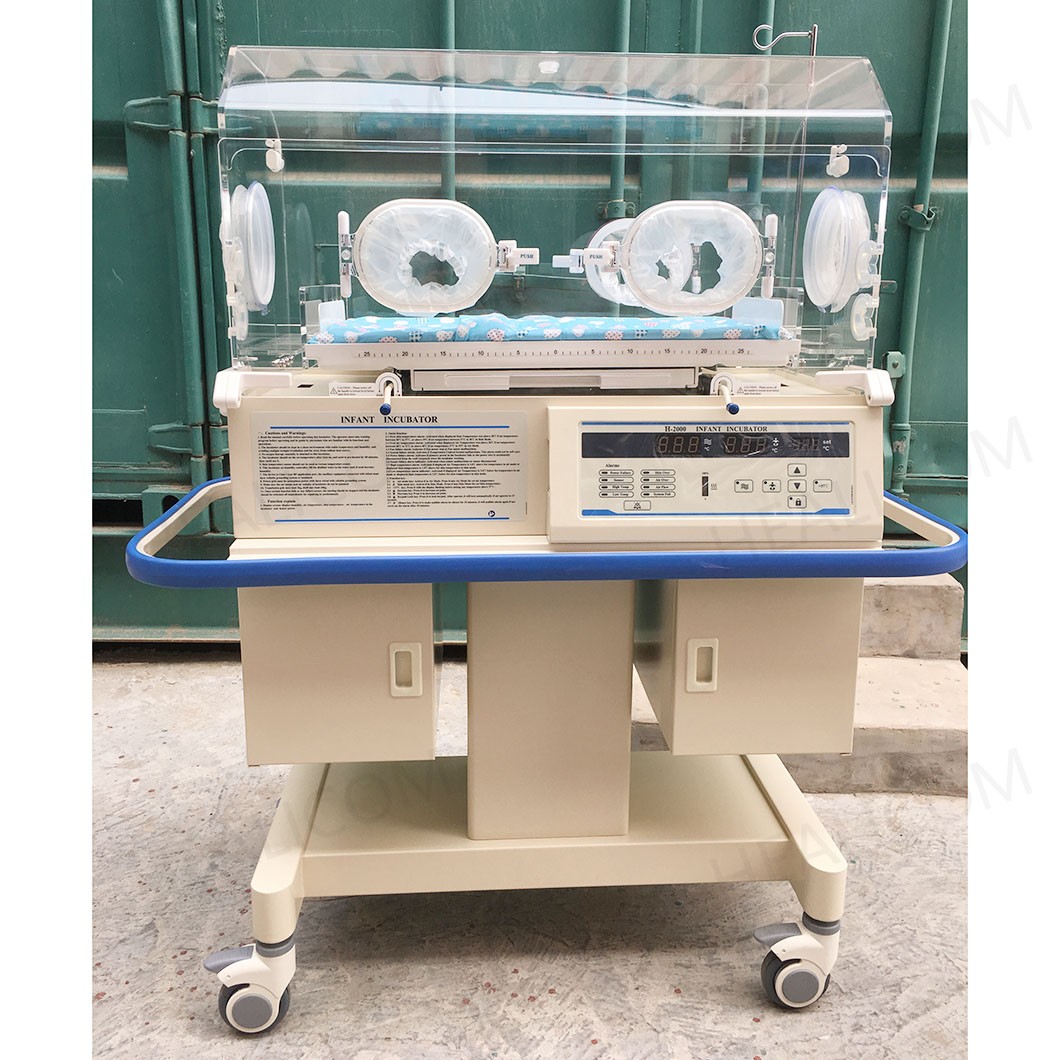 A buyer comparison should connect infant incubator features to the intended neonatal-care workflow.
Review monitoring and alarms with the response process
Integrated displays, trend views, alarms, and connectivity options can influence the usability of neonatal intensive care equipment. They should be assessed alongside the hospital’s response process. Compare which values are displayed, how alarm limits are configured, how alarms are prioritized, whether event history is available, and what interfaces or data-export options are documented for the proposed configuration.
Do not treat integrated information as a substitute for clinical monitoring policy. Ask who will recognize an alert, what action is expected, and how alarm settings are verified at commissioning. If connectivity is proposed, confirm compatibility, cybersecurity responsibilities, and validation requirements with the responsible hospital teams before treating it as an included project benefit.
Make infection-control and service tasks visible
Cleaning and maintenance are often underweighted in an early comparison, even though they shape availability over the life of an infant incubator. Request the manufacturer’s cleaning and disinfection instructions, the list of removable parts, drying requirements, recommended inspection intervals, preventive-maintenance tasks, and the route for obtaining replacement parts.
Compare how easily staff can access surfaces, filters, reservoirs, and consumable components without creating ambiguity about reassembly. For newborn care equipment, a lower initial quotation can be difficult to interpret if essential accessories, maintenance tools, training, or service documentation are not included in the same scope. Put those items on the same matrix as the device itself.
Compare safety evidence and configuration scope
Ask every supplier for a configuration-specific document pack. IEC 60601-2-19:2020 addresses the basic safety and essential performance of infant incubators, but procurement teams should verify the applicable edition, local requirements, model identity, accessories, and market documentation with qualified reviewers. A general claim is not the same as evidence for the exact quoted unit.
The comparison should also separate standard equipment from optional modules. List the base unit, control modes, mattress and scales if applicable, humidification-related components, monitoring interfaces, mounting hardware, probes, accessories, manuals, training, warranty scope, installation support, and service response arrangements. This prevents a comparison between unequal configurations.
A buyer matrix for an infant incubator shortlist
| Comparison area | What to request | Decision question |
|---|---|---|
| Thermal control | Modes, sensors, displays, alarm descriptions, acceptance procedure | Does the quoted setup support the planned infant thermal support workflow? |
| Enclosure and access | Canopy, porthole, door, mattress, and cable-management details | Can staff complete expected tasks while managing access-related conditions? |
| Environment and cleaning | Humidity-related options, cleaning instructions, removable parts, consumables | Can the unit be prepared and maintained within local procedures? |
| Monitoring and interfaces | Alarm behavior, displays, event records, connectivity documentation | Who responds, and what validation is needed before use? |
| Service and acceptance | Installation plan, training, maintenance schedule, parts, warranty terms | Are responsibilities and acceptance criteria documented before purchase? |
Use demonstrations to close the remaining gaps
A structured demonstration is more informative than a general presentation. Give each supplier the same scenario and score the response against the agreed matrix. Include the clinical, engineering, procurement, and infection-control perspectives. Then record open questions, requested documents, configuration changes, and acceptance criteria before moving to a final quote.
The most useful infant incubator comparison ends with a traceable choice: a defined clinical workflow, a confirmed configuration, evidence appropriate to the intended market, and a plan for installation, training, and maintenance. That approach helps buyers assess a neonatal incubator as part of a care system rather than as a list of isolated features.
FAQ
Which features matter first when comparing an infant incubator?
Start with the intended care scenario, thermal-control modes, staff access needs, alarm workflow, cleaning requirements, and the exact configuration included in each quotation. The priority order should be confirmed by the local clinical and engineering teams.
How should buyers compare infant thermal support features?
Compare the control modes, sensor requirements, displayed information, alarm behavior, access workflow, and documented acceptance checks together. A single temperature specification does not describe the full operating process.
What documents should accompany neonatal intensive care equipment?
Request configuration-specific instructions for use, applicable safety documentation, installation and maintenance requirements, training scope, accessory lists, warranty terms, and evidence needed for the target market. Qualified local reviewers should confirm applicability before purchase.
 Hot News