EN


What Is an Operating Table and What Features Matter Most?
An operating table is the patient-support platform used to place, secure, and reposition a patient during a procedure. It is not ordinary operating room furniture. The table becomes part of the surgical workflow: it has to give the clinical team access to the operative site while leaving room for anesthesia, imaging, accessories, and safe staff movement. For a hospital buyer, the practical question is not simply whether an operating table moves. It is whether its movement, support surfaces, controls, and service model fit the procedures the room will actually handle.
That distinction matters because a surgical team may use the same room for very different cases. An adjustable surgical table that works well for routine supine procedures may need different sections, attachments, imaging clearance, or weight capability for urology, orthopedics, trauma, or minimally invasive work. A useful evaluation starts with the procedure mix and ends with a documented acceptance check, rather than a feature list alone.
What does an operating table do?
At its core, an operating table supports controlled patient positioning. A typical system includes a base, column, tabletop or modular sections, pads, side rails, controls, and optional accessories. Depending on its configuration, the operating table may raise, lower, tilt, slide, flex, extend, or separate into sections. These movements help the team establish access while maintaining a stable, supported position.
The table also affects how other hospital surgery equipment can be used around the patient. C-arm imaging may require a clear radiolucent area and sufficient longitudinal travel. Anesthesia equipment needs access at the head end. Ceiling-mounted systems, surgical lights, staff circulation, and transfer routes all compete for space. Therefore, table selection is a room-integration decision as well as a clinical one.
Safe positioning is broader than the equipment itself. Published perioperative guidance emphasizes planning, team knowledge, and teamwork; equipment features support that process but do not replace it. For longer cases or positions that concentrate pressure, the team should assess the patient, support surfaces, positioning aids, and monitoring protocol together.
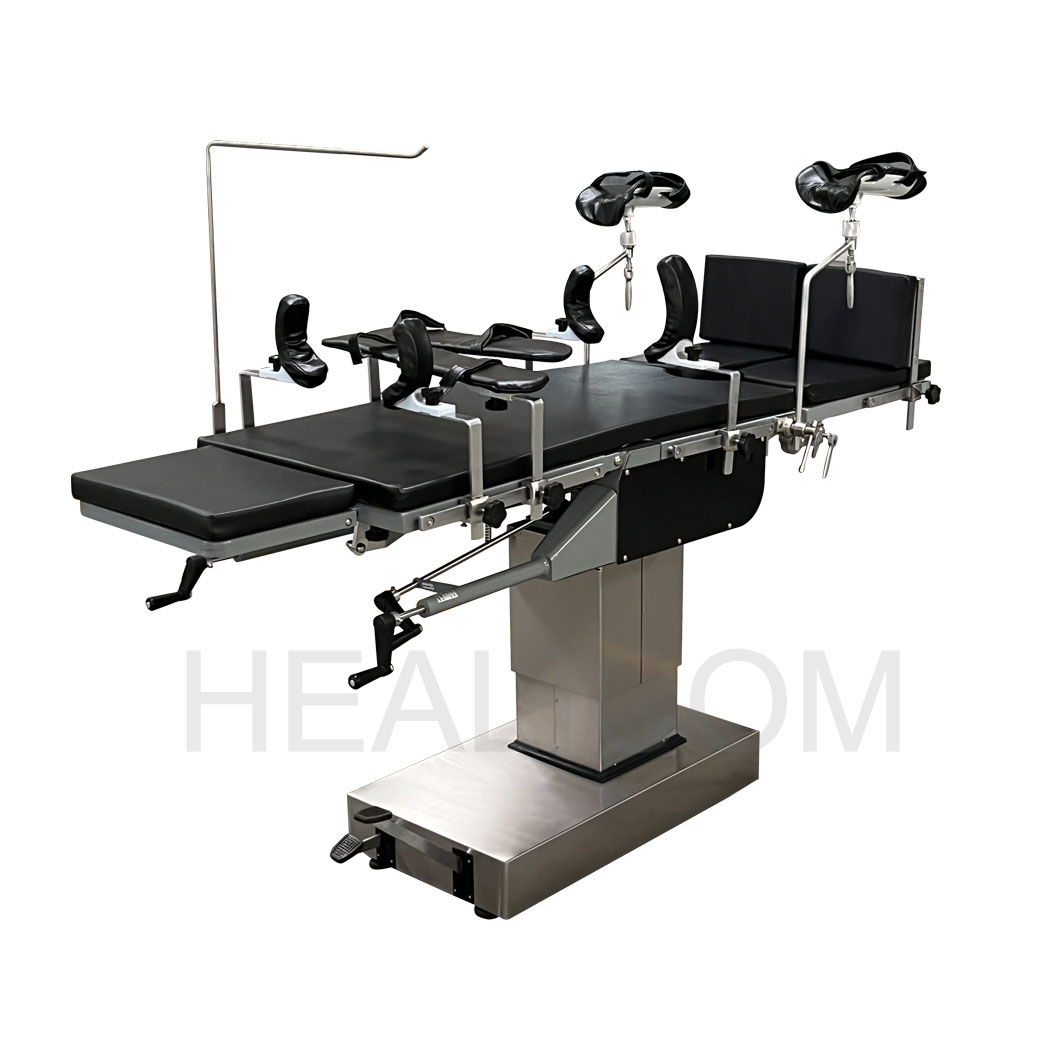 An operating table must fit positioning, imaging, and room-access requirements.
Feature 1: articulation that matches real procedures
Articulation means the controlled changes in table height, tilt, back section, leg section, kidney bridge, tabletop slide, and other movements available on an operating table. The right range depends on the planned specialties. A general surgical operating table might need dependable height adjustment, Trendelenburg and reverse Trendelenburg, lateral tilt, and back/leg section movement. Specialty work may call for a more specific tabletop, extensions, traction capability, or compatible attachment connection.
Ask clinicians to describe their positioning sequence, not merely name a specialty. Where must the patient start? Which position changes occur after draping? Does imaging need to happen before or after a movement? Can each requested movement be performed with the planned accessories and patient load? This turns a vague request for an adjustable surgical table into testable requirements.
Feature 2: stability, load limits, and a usable safety margin
An operating table must remain stable through the full intended movement range, not just when it is level and unloaded. Review the stated patient load, but also clarify whether the figure applies during articulation, with extensions, with imaging accessories, and with a patient transferred onto the surface. Accessories and positioning aids can change both the load distribution and the center of gravity.
During demonstrations, observe base clearance, locking behavior, column rigidity, and any restriction on tilt or slide under load. The procurement file should distinguish a quoted maximum from the clinically usable configuration. It is sensible to have biomedical engineering and clinical users witness representative movements before acceptance.
Feature 3: imaging access without workflow compromise
For rooms that use mobile imaging, radiolucency and tabletop travel are operational requirements, not optional marketing terms. The operating table should provide the imaging window needed for the target anatomy and permit the planned C-arm approach without repeated patient transfers. Ask for a demonstration with the room’s imaging workflow whenever possible.
Verify where metal components, column geometry, table pads, clamps, and accessories may affect image access. A longer radiolucent section is not automatically suitable if the base or attachments obstruct the required projection. Document the expected imaging views and have the supplier confirm the configuration used for the evaluation.
Feature 4: controls that the team can use safely
Controls should be reachable, understandable, and appropriate for a busy operating room. Depending on the system, an operating table can use a hand pendant, column controls, foot controls, wired or battery-powered controls, and emergency functions. The key question is how the team confirms an intended movement and responds if a normal control path is unavailable.
- Check whether staff can identify the controls while wearing gloves and working around sterile drapes.
- Review locking, stop, and emergency-lowering functions with the actual users.
- Confirm battery status indication, charging routine, and the documented contingency procedure.
- Include user training and a return demonstration in the implementation plan.
Controls are a patient-safety feature only when they are paired with training, role clarity, and a local procedure for positioning changes.
Feature 5: hygiene and cleanability
An operating table sits in a high-turnover environment, so cleanability deserves the same attention as movement. Inspect joints, seams, rails, pad joins, control housings, and the base for areas that are difficult to access or incompatible with the facility’s approved cleaning agents. Request the manufacturer’s cleaning and disinfection instructions, including any limits on chemicals, immersion, or removable components.
The same review applies to positioning aids. A surface that is comfortable but cannot be cleaned according to the facility routine may create an avoidable operational problem. Include infection-prevention staff in the review of operating room furniture and accessories, especially when new pads, rails, or attachment systems are introduced.
Feature 6: serviceability and lifecycle readiness
An operating table can be mechanically capable yet still create downtime if service support is unclear. Before purchase, ask who provides installation, preventive maintenance, fault response, software updates where applicable, spare parts, battery replacement, and user retraining. Request service intervals, expected consumables, warranty scope, and an escalation contact in writing.
Also consider room readiness: floor condition, electrical supply, storage for accessories, transfer workflow, and the route for moving the table or transporter. These details are often discovered late, when the equipment is already on site. A pre-installation checklist reduces that risk.
A practical operating table evaluation checklist
Use this short sequence when comparing an operating table or a surgical operating table:
- List the procedures, patient populations, positions, and imaging views the room must support.
- Map required articulation, height range, tabletop sections, rails, pads, and accessories to those needs.
- Test stability and movement with a representative setup, not an empty tabletop.
- Review imaging clearance with the intended workflow and equipment.
- Check cleaning instructions against the hospital’s actual products and turnaround process.
- Review controls, emergency procedures, training, preventive maintenance, and service response.
- Record acceptance criteria and any configuration limits before placing the final order.
Final perspective
The most suitable operating table is the one that supports the intended clinical workflow with clear limits, safe positioning practice, workable imaging access, cleanable surfaces, and maintainable controls. Rather than treating the table as a standalone purchase, evaluate it as part of a connected operating room system. That approach gives clinicians, infection-prevention teams, biomedical engineers, and purchasing staff a shared basis for deciding which features matter and which must be verified before use.
 Hot News