EN


How to Choose an OCT Machine for an Ophthalmology Clinic
Choosing an OCT machine is less about finding the longest feature list and more about matching optical coherence tomography to the examinations your clinic actually performs. An OCT is a non-invasive imaging method that uses light to create cross-sectional views of retinal structures, but the right workflow can look very different in a glaucoma-led practice, a retina clinic, or a mixed ophthalmology office.
From a medical-equipment selection perspective, start with the clinical workflow, installation conditions, and service resources before comparing isolated specifications. A useful buying decision should let clinicians acquire and review images consistently, let technicians move patients through the room safely, and give administrators a clear way to validate cost and support commitments.
1. Turn your clinical needs into an OCT requirements list
Begin by mapping the services that will rely on the OCT. Retina follow-up may place emphasis on macular scans, repeatability, and longitudinal review. A glaucoma workflow may require dependable optic nerve and retinal nerve fiber layer protocols, trend displays, and a clear review process for segmentation errors. If anterior-segment imaging, pediatric care, research, or mobile screening is important, make it an explicit requirement rather than assuming every system covers it in the same way.
Ask each user group what happens before, during, and after a scan. For example, identify who enters patient data, who positions the patient, who rescans poor-quality images, who reviews the result, and where the image must appear afterward. This prevents a common purchasing mistake: evaluating an optical coherence tomography machine as a stand-alone camera rather than as part of the clinic’s patient and documentation flow.
- List the disease pathways and scan protocols needed at launch.
- Estimate daily scan volume and the mix of new versus follow-up patients.
- Define who may acquire, review, edit, and export images.
- Document exceptions, such as limited mobility, small pupils, media opacity, or wheelchair access.
2. Compare imaging performance in the context of your protocols
When evaluating an OCT, ask vendors to demonstrate the same protocol set on the configurations under consideration. Resolution, scan speed, scan patterns, eye tracking, follow-up registration, signal-quality indicators, and segmentation tools matter only if they support a repeatable protocol in your setting. More accurately, the key question is not whether a feature appears on a specification sheet, but how staff can verify that it works under the conditions of the intended workflow.
For glaucoma-focused use, review how the system handles optic nerve head, retinal nerve fiber layer, and ganglion-cell analysis where applicable. For medical retina, assess macular volume acquisition, cross-sectional review, comparison views, and the process for checking automated boundaries. Do not treat color maps or automated classifications as a substitute for professional interpretation; instead, decide how the clinic will identify artifacts, poor fixation, and segmentation errors.
If OCT angiography is on the shortlist, define its clinical purpose before paying for it. Request a practical demonstration of acquisition time, motion-artifact management, slab adjustment, export options, and the staff training needed for consistent use. An OCT angiography feature may be valuable for selected services, but it should be evaluated with the same protocol and review standards as the rest of the platform.
3. Test patient flow, ergonomics, and room fit
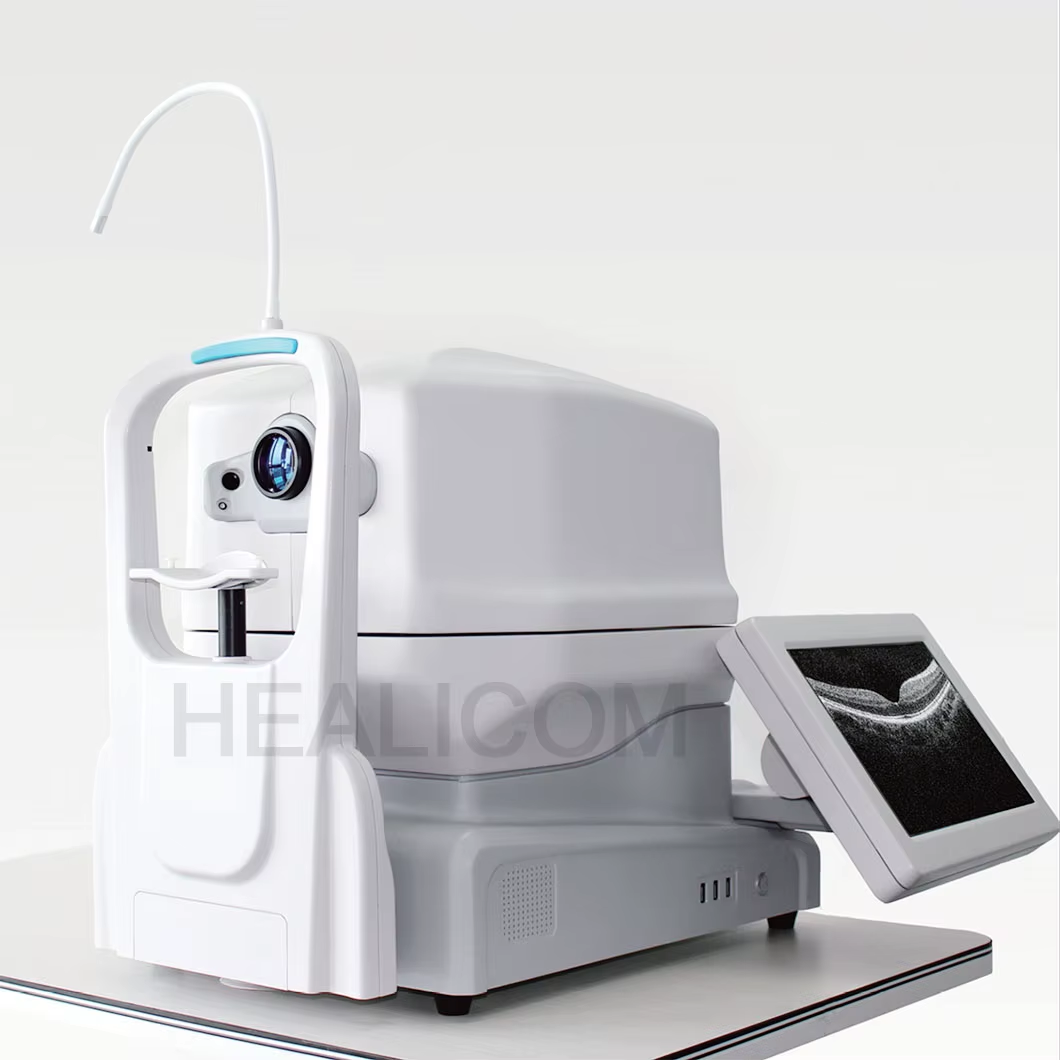
Put the OCT into the real examination sequence before approving it. Measure the imaging room, patient approach path, desk position, network outlet location, and cable route. Then test how the chin rest, joystick, screen position, and patient alignment work for your typical population. A system that performs well in a short demonstration can still create delays if technicians need repeated repositioning or if access is difficult for patients with limited mobility.
Consider whether a portable OCT machine is truly necessary. Portability may help with bedside, outreach, or pediatric workflows, but it can introduce different expectations for image acquisition, battery management, data synchronization, and stable positioning. Compare it against the clinic’s actual mobile use case, not simply the appeal of a smaller footprint.
During a site evaluation, have the future operators run a small, representative sequence: register a patient, capture the planned scans, repeat a scan, review image quality, compare a prior study, and prepare the output for the clinical record. This is often more revealing than a speed claim alone.
4. Verify connectivity, data handling, and cybersecurity early
An OCT purchase should include an integration conversation before a purchase order is signed. Confirm how the system handles patient demographics, worklists, image storage, exports, user roles, audit trails, software updates, and network requirements. Ask the vendor to document supported interfaces and the responsibilities for configuration, testing, and ongoing support.
Clarify whether images and reports can be reviewed in the systems your clinicians already use and whether historical data can be accessed after software changes. If your clinic has IT policies for network segmentation, remote support, backups, or user access, give those requirements to the vendor in writing. This is especially important when the OCT will become part of a high-volume follow-up workflow.
5. Assess the total cost of an OCT machine, not just the quote
Initial price is only one part of an OCT decision. Build a comparison table that includes installation, workstation or network preparation, software modules, service coverage, training, replacement parts, upgrade policies, and any recurring fees. The OCT machine cost should be reviewed beside the capacity your team needs and the time required to maintain reliable acquisition and review.
Ask what is included in the base configuration and what changes when you add OCT angiography, advanced analysis, a second review station, remote access, or a portable OCT machine. Also ask how the vendor handles downtime, loan units, preventive maintenance, and escalation. A lower entry quote may not be the lower all-in cost if support boundaries are unclear.
6. Check regulatory documents, training, and service commitments
Request the documentation applicable to your market and the specific configuration being quoted. In the United States, that means verifying the device’s FDA marketing status and intended-use documentation rather than relying on general claims. In other markets, confirm the relevant local registration and labeling requirements with the responsible parties.
Training deserves the same scrutiny as the hardware. Define the initial user group, the training format, competency checks, refreshers for staff turnover, and the process for resolving image-quality questions. A practical service plan should identify response targets, covered components, remote-support conditions, software-update responsibilities, and the route for clinical application questions.
7. Use a structured vendor demonstration and acceptance checklist
Before selecting an OCT, give each finalist the same scenario-based checklist. It keeps the decision focused on operational fit rather than presentation style.
- Run your priority retina and glaucoma protocols with clinic-style patient registration.
- Show image-quality feedback, repeat acquisition, and review of segmentation or motion artifacts.
- Demonstrate follow-up comparison and the intended report or image-export path.
- Confirm room, power, network, and workstation requirements in writing.
- Itemize the purchase configuration, optional modules, training, warranty, and service terms.
- Provide the applicable regulatory and intended-use documentation for the exact model and software version.
Final decision: choose the OCT that your clinic can verify in daily use
The appropriate OCT machine for an ophthalmology clinic is not a universal model. It is the system whose protocols, ergonomics, data pathway, support plan, and total ownership demands align with the services your team provides. Start with workflow, translate that workflow into demonstrable requirements, and record what each vendor can confirm. That approach gives clinicians and procurement teams a shared basis for choosing an OCT with fewer avoidable surprises after installation.


 Hot News