EN


What Features Should Buyers Compare in an OCT Scanner?
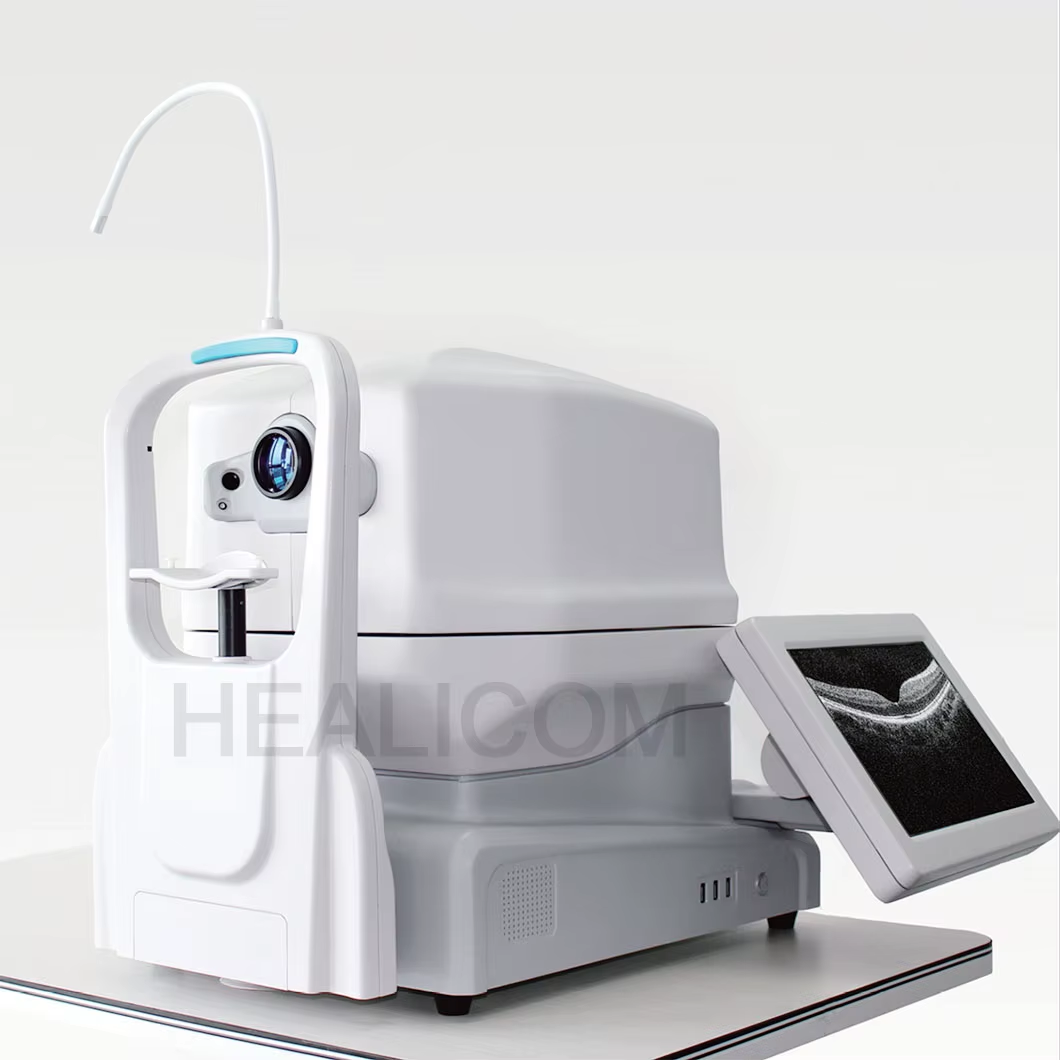
Buying an OCT scanner is not simply a matter of choosing the highest specification on a brochure. Optical coherence tomography gives cross-sectional views of retinal structures using light, but the value of an OCT system depends on whether its OCT scan protocols, image quality, workflow, and data tools fit the patients and staff who will use it. A useful comparison starts with the OCT clinical questions your practice needs to answer, then tests whether each OCT configuration supports those questions reliably.
From a hospital-procurement perspective, it helps to put the OCT scanner into the examination workflow before comparing features. A retina-focused service, a glaucoma clinic, and a general eye-care practice may all use OCT, but their preferred fields of view, follow-up tools, throughput requirements, and training priorities can differ. The checklist below turns those differences into supplier questions.
Start with the OCT imaging task, not the feature count
Write down the intended OCT use cases before reviewing OCT quotations: routine macular imaging, optic-nerve and RNFL assessment, wide-field retinal review, anterior-segment imaging, or a mix. Then ask which scan patterns, analysis modules, and review tools are included as standard and which require an option or subscription. This prevents an OCT comparison in which one system appears more capable simply because it lists features your clinicians do not plan to use.
An OCT scanner should also be assessed in its real environment: who acquires images, who reviews them, where patients are positioned, and how results enter the record. More accurately, the question is not whether a device has many modes; it is whether its modes can be acquired consistently in the target workflow.
1. Compare resolution, scan speed, and image quality together
Resolution is often the first OCT specification buyers see, yet it is only one part of a usable image. Axial resolution affects how finely layers can be distinguished, while transverse resolution, signal quality, averaging, focus, and motion control all influence what staff can review in practice. Ask each supplier to define the test conditions behind a stated resolution figure and show representative images produced with the proposed scan protocol.
Scan speed matters because faster acquisition can support OCT patient comfort, reduce susceptibility to motion, and make dense scan patterns more practical. Technology summaries commonly describe spectral-domain systems in tens of thousands of A-scans per second and swept-source systems at higher rates, but those broad ranges are not a procurement specification. Compare the model-specific speed, scan density, averaging approach, and image quality on similar patients rather than treating any one number as a verdict.
- Request axial and transverse resolution, scan speed, and scan-pattern specifications in the same units.
- Ask whether stated performance changes by scan length, averaging, tracking, or eye condition.
- Review low-signal and difficult-acquisition examples, not only promotional images.
2. Check wavelength, penetration, field of view, and scan options
Different OCT designs balance resolution, depth, and acquisition speed differently. For example, buyers considering deeper retinal or choroidal visualization should ask how the proposed OCT wavelength and scan protocol affect penetration and image quality in the intended population. A broader field of view may be valuable for some services, but it should be compared alongside resolution across that field and the time required to acquire the scan.
Build an OCT side-by-side table for macular cubes, radial scans, optic-nerve-head scans, wide-field options, enhanced-depth modes, anterior-segment capability where relevant, and the availability of en face viewing. The phrase coherence tomography describes the modality; it does not confirm that every scanner has the same scan geometry or analytical tools.
3. Evaluate fixation, tracking, and repeatability
A technically strong OCT scanner still needs to deliver repeatable images when patients blink, have poor fixation, or return for longitudinal follow-up. Compare internal fixation targets, external fixation support, eye tracking, OCT follow-up registration, motion correction, and quality-score prompts. Ask a demonstrator to show how the system handles a repeat scan and how staff can recognize when a comparison is unreliable.
For glaucoma or retinal monitoring workflows, registration between visits can be as important as the first image. Confirm whether the software aligns the same retinal location over time, how it flags poor alignment, and what happens when a prior scan cannot be matched. This is also where a 3d eye scan display should be judged carefully: a compelling volume view can be helpful, but review tools, slice navigation, and repeatability are more useful than visual impact alone.
4. Compare analysis software and segmentation controls
OCT analysis software determines how raw OCT data becomes a reviewable examination. Compare retinal-layer segmentation, thickness maps, optic-nerve or RNFL analysis where applicable, progression displays, normative-database information, and manual correction tools. Algorithms can fail on pathology, low signal, unusual anatomy, or media opacity, so buyers should ask how an operator identifies and corrects segmentation errors rather than assuming an automated map remains valid in every scan.
Request clarity about software versions, included modules, update frequency, language options, user permissions, and whether historical studies remain accessible after an upgrade. If artificial-intelligence decision support is offered, ask for its intended use, validation documentation, limits, and local regulatory status. It should support professional review, not replace it.
5. Verify workflow, ergonomics, and patient access
Throughput is shaped by more than scan speed. Compare setup time, alignment aids, auto-capture behavior, operator prompts, image-review steps, and the number of clicks needed to complete an examination. A supplier demonstration should include a normal acquisition, a low-cooperation scenario, a repeat visit, export, and a correction of a failed segmentation. The eye test and OCT scan workflow should be observed from patient entry to record completion.
Also inspect chinrest and forehead-rest adjustment, wheelchair access, monitor positioning, room footprint, cleaning instructions, and accommodation for patients with limited mobility. Ask what training is included for different user roles and how competency is documented. These details often determine whether a well-specified OCT system is used consistently.
6. Compare connectivity, cybersecurity, and data ownership
An OCT purchase should include an OCT data-path review. Confirm DICOM support, worklist integration, EMR connectivity, image export formats, user authentication, audit trails, backup options, remote-service access, and network requirements. Obtain written information on software licensing, cloud storage if offered, retention options, and the process for exporting patient studies if the service contract changes.
Ask the supplier and local IT team to verify compatibility in the actual environment. Do not rely on a general statement that a device is “integrated”; interfaces, licenses, configuration work, and responsibility for troubleshooting should be named in the proposal.
7. Look beyond the initial price
Compare the complete OCT ownership picture: base unit, required analysis modules, installation, networking, delivery, training, preventive maintenance, repairs, software updates, loaner arrangements, and response times. Put these items into the same evaluation sheet as image quality and workflow. A lower initial price may not be comparable if it excludes modules or support needed for the selected OCT workflow.
Ask for warranty terms, service coverage boundaries, expected maintenance tasks, software-update policy, and the location of qualified service support. Before award, request a final configuration list that names every accessory, license, and interface.
A practical OCT comparison checklist
| Comparison area | Questions for suppliers | How to verify |
|---|---|---|
| Image performance | What are the scan speed, resolution, scan density, and quality controls for the proposed OCT protocol? | Review matched sample scans and documented specifications. |
| Clinical fit | Which scan patterns and analysis modules support the intended service? | Map each need to an included feature or option. |
| Repeatability | How do tracking, registration, and follow-up tools work? | Demonstrate repeat scans on the same workflow. |
| Software | Can users inspect and correct segmentation or review raw B-scans? | Test a correction and check licensing terms. |
| Integration | Which interfaces, security controls, and export options are included? | Confirm with local IT and written interface scope. |
| Support | What training, maintenance, updates, and response commitments apply? | Compare warranty and service documentation line by line. |
Make the final decision with a documented demonstration
The most defensible OCT comparison combines specification review with a scripted demonstration and an OCT total-cost comparison. Give each supplier the same clinical scenarios and ask them to document the exact configuration used. Then score image quality, repeatability, workflow, analysis, integration, training, and service against OCT priorities agreed by clinicians, procurement, engineering, and IT.
That approach avoids an OCT single-parameter decision. The right OCT scanner is the one whose imaging capability, acquisition reliability, data pathway, and support model can be verified for your intended OCT workflow. Final clinical, regulatory, and cybersecurity acceptance should remain with the qualified teams responsible for those decisions.
 Hot News