EN
EN


How to Plan Dental Chair Procurement for Multiple Clinics
Buying a dental chair for one operatory is a product decision. Planning a dental chair rollout across several clinics is a program decision: clinical teams need workable rooms, project managers need predictable handoffs, and service teams need a supportable installed base. From a procurement perspective, the useful starting point is not “Which model has the longest feature list?” It is “What must be consistent, where can each site vary, and how will we verify readiness before delivery?”
A phased plan helps a group practice avoid a common problem: purchasing an electric dental chair before utility positions, delivery-system choices, imaging needs, and service responsibilities are aligned. The framework below turns that work into decisions your locations can compare and approve.
1. Create one procurement brief, then add site-specific schedules
Begin with a master brief for the full network. It should define the treatment types, expected operatory count, rollout sequence, target opening dates, budget ownership, and the people authorized to approve substitutions. That master brief becomes the common language for procurement, clinical leadership, facilities, IT, and the supplier.
Then build a short schedule for each location. Record the room dimensions, planned chair position, handedness, existing utilities, building constraints, infection-control workflow, and local installation window. A standard dental chair configuration may be sensible across the group, but a room with a different doorway, ceiling condition, or utility route may require a documented exception. Standardization should reduce avoidable variation; it should not force an unsuitable installation.
2. Translate clinical workflow into a dental treatment unit specification
Ask each clinical lead to describe the work performed in the operatory before comparing specifications. For example, identify whether the room supports general dentistry, hygiene, pediatric care, surgical work, or a mixed schedule. Clarify the positions of the operator, assistant, patient monitor, light, delivery system, suction, and storage during a typical procedure.
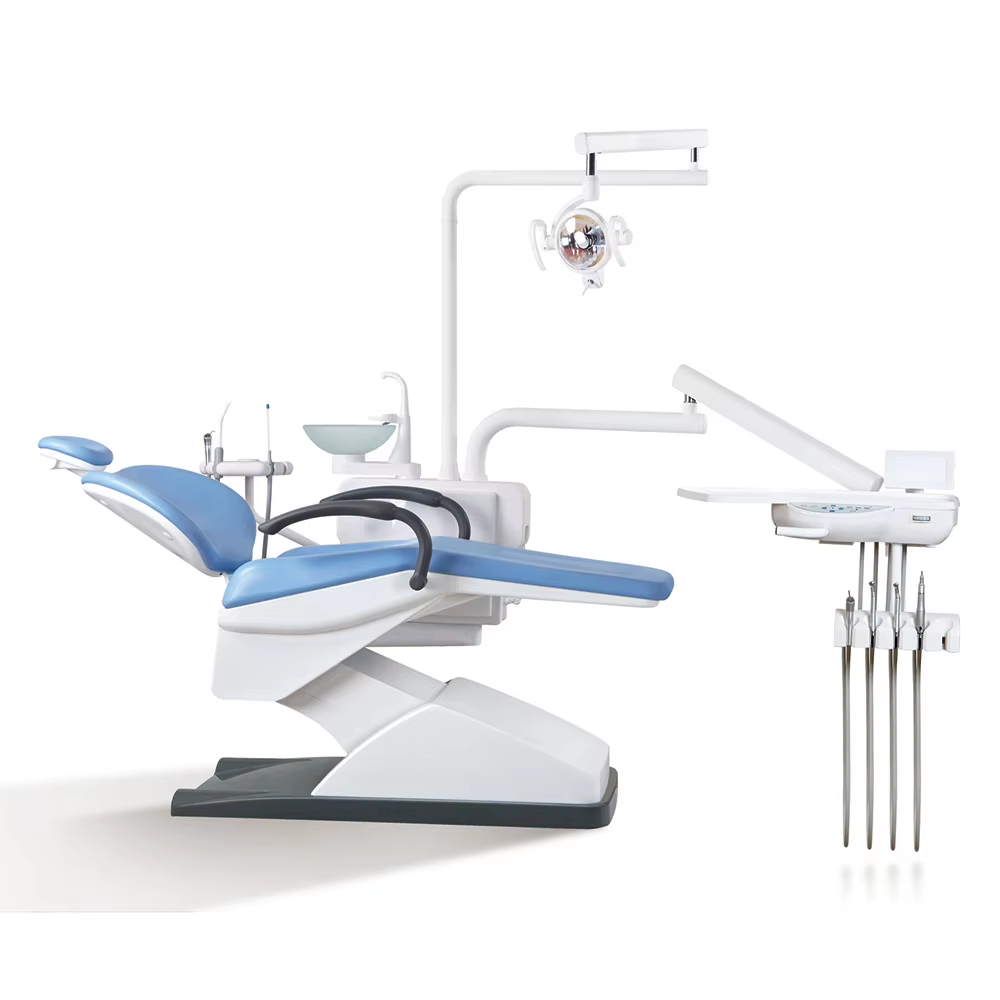
Use those answers to define a common dental treatment unit baseline. Your comparison sheet can include delivery-system layout, operator and assistant access, foot-control preference, lighting interface, upholstery choices, monitor or imaging provisions, and required accessories. More features are not automatically more useful. A feature belongs in the baseline only when the target workflow, training plan, and room layout can support it.
| Decision area | Network baseline | Site-level verification |
|---|---|---|
| Patient positioning | Chair movement and preferred operating positions | Clearance from walls, cabinetry, and patient access route |
| Delivery layout | Operator/assistant configuration and control logic | Handedness, storage, and staff working habits |
| Utilities | Required services stated in supplier documentation | Air, water, suction, drainage, electrical, and data routing |
| Digital integration | Monitor and imaging connection requirements | Mounting points, cable paths, and local IT coordination |
| Serviceability | Parts, training, and escalation expectations | Access for technicians and local shutdown procedures |
3. Run a site-readiness gate before issuing final purchase orders
Do not treat a supplier quotation as proof that a room is ready. Before final release, have each clinic confirm its drawings and utility plan with the relevant installer, contractor, and supplier documentation. A dental clinic setup normally has to coordinate service positions for air, water, suction, drainage, electrical power, and data; the exact requirements must be verified against the selected equipment and local conditions.
For every operatory, use a sign-off sheet that captures utility rough-ins, floor and wall conditions, service clearances, delivery access, storage for components, and the date when the room can accept installation. Include a named owner for any unresolved item. This is especially important when sites open in phases: an incomplete utility correction can hold up a single chair while delivery, training, and staffing have already been scheduled for the rest of the clinic.
4. Separate the commercial comparison from the total-cost comparison
Use a consistent bid template so every supplier responds to the same scope. Compare the chair package, optional accessories, installation responsibilities, delivery timing, commissioning, user training, warranty terms, spare-parts approach, and service response process. If a line item is excluded, make the exclusion visible rather than assuming another party will cover it.
The lowest equipment price can be misleading when a rollout requires electrical work, plumbing changes, suction upgrades, staff training, or later relocation. A practical review table lists one-time project costs alongside recurring support costs. The aim is not to predict a universal saving; it is to make the assumptions visible enough for finance and operations to challenge them before a commitment is made.
5. Plan dental chair maintenance as a network process
A multi-site purchase should leave each clinic with the same basic dental chair maintenance routine, but it also needs a central way to monitor exceptions. Define what the local team checks daily, what is recorded after cleaning, which issues require a service call, and where serial numbers, service reports, and warranty documents are stored.
Ask suppliers to explain preventive-maintenance intervals, consumables, common replacement parts, remote troubleshooting options, and the escalation path for downtime. Confirm whether each location can safely isolate the relevant utilities during service. These questions are not merely administrative: they determine whether a standard dental chair can remain available during a busy day without informal workarounds.
6. Pilot, accept, and roll out in waves
For a large program, start with a pilot location or a representative operatory. Use it to verify installation sequencing, user training, room circulation, documentation quality, and the commissioning checklist. The pilot should test the process, not just the equipment. If the team discovers that cable routing, accessory selection, or cleaning instructions are unclear, correct the baseline before ordering the next wave.
At acceptance, record the installed configuration, serial number, room reference, training completion, open issues, and responsibility for closure. Repeat the same acceptance template at every clinic. A short post-installation review after the first operating weeks can surface recurring questions early and improve later waves.
A practical procurement checklist
- Confirm the clinical services and operating roles each dental chair must support.
- Set a network baseline for the dental treatment unit, then document approved site exceptions.
- Verify room drawings, utilities, access, and service clearances before final release.
- Compare bids on installation, training, commissioning, warranty, and service—not price alone.
- Create shared dental chair maintenance records and an escalation process before go-live.
- Pilot the documentation and acceptance process, then release later clinics in manageable waves.
Conclusion
Strong multi-clinic dental chair procurement is a coordination exercise. By standardizing the questions, verifying each room before release, and treating installation and maintenance as part of the scope, a group can make decisions with fewer late surprises. Healicom Medical Equipment Co.,LTD. can help procurement teams organize configuration questions and supplier discussions for dental and other medical-equipment projects; final choices should be confirmed against the selected equipment documentation, site conditions, and local requirements.

 Hot News